On this page · 15 sections5 min read
- 01Our verdict
- 02At a glance
- 03Pros & cons
- 04The two plans
- 05What a Sunday evening looks like with it
- 06Topics beyond editing
- 07Learning tracks, the part to use first
- 08Learning on your schedule
- 09The catch: nobody looks at your photos
- 10Who should skip it
- 11Monthly or annual, honestly
- 12Alternatives
- 13Your next step
- 14Score breakdown
- 15FAQ
Our verdict
Our verdict8.8/10Photographers who edit in Lightroom or Photoshop and want one place to keep learning (nearly 1,000 courses from more than 100 instructors, with a new one every week) get the most from KelbyOne, especially on the $199 annual plan with its 30-day money-back guarantee (October 30, 2026).
If what you need is someone looking at your own photos, The School of Photography adds critiques and assignments for less. The catch: KelbyOne is a video library. There's no feedback on your work and no certificate, so progress depends on you doing the exercises.
Best for: hobbyist and semi-pro photographers who use Lightroom or Photoshop and want a large, steadily updated library of editing and shooting courses for one yearly fee.
At a glance
Last Saturday you shot 400 frames at the coast. Sunday night you opened Lightroom, pushed a few sliders, exported six photos and felt vaguely disappointed by all of them. The light was better than that. You know there’s a way to get from the raw file to the picture you remember; you just don’t know the steps. KelbyOne is a library of those steps.
KelbyOne, founded by Scott Kelby, has been teaching photographers since 2007. It’s a membership: one price gives you nearly 1,000 courses on photography, Lightroom and Photoshop from more than 100 instructors, with a new course every week, each split into short practical lessons.
How we reviewed it: on October 30, 2026, we read KelbyOne’s home page and pricing page, including the plan details and FAQ, and compared them with the other photography courses on our site. We haven’t taken the courses.
Some links on this site earn us a commission if you enroll. Your price stays the same. Our rankings are based on our editorial criteria; some partners may be featured more prominently. How we review
Pros & cons
- Nearly 1,000 courses from more than 100 instructors, with a new course every week
- Guided learning tracks that put courses in order, plus practice files to follow along with
- Annual plan at $199 (about $16.58 a month) with a 30-day money-back guarantee
- App with offline downloads, captions, transcripts and playback speed control
- No feedback on your own photos: it's courses and community help, not critiques
- No certificate, which matters little for hobbyists but rules it out as a credential
- The monthly plan's money-back window is only 7 days
- Lightroom and Photoshop themselves aren't included; you need your own Adobe subscription to follow most courses
The two plans
On October 30, 2026:
- Monthly: $19.99 a month (shown against $24.99), with a 7-day money-back guarantee.
- Annual: $199 a year (shown against $249), about $16.58 a month, with a 30-day money-back guarantee.
Both include the same library. The annual plan saves $40.88 over twelve monthly payments, and its refund window is four times longer, which is the better reason to pick it. There’s no contract on either, and you can cancel any time. KelbyOne also sells gift and group memberships.

What a Sunday evening looks like with it
Back to those coast photos. You open the Lightroom track, which starts with organizing your catalog, then moves to editing color, tone and masks, then to exporting and printing. You download the practice file, follow the lesson on your own screen, then try the same steps on your own picture. Twenty minutes, one technique, one better photo.
That’s how KelbyOne works best: a short lesson, used right away. The courses are full start-to-finish processes rather than random clips, and the learning tracks put them in an order, so you’re not left guessing which course comes first.
Topics beyond editing
Editing is the core, but the catalog covers shooting too: scenic and outdoor work, travel, wildlife, macro, iPhone, composition, astro and night photography, fundamentals, portraits, and studio and flash lighting. If you’re heading on a trip, the travel courses before you leave are worth more than another preset pack.
Learning tracks, the part to use first
A library of nearly 1,000 courses has an obvious problem: where do you start? KelbyOne’s answer is its learning tracks, sequences of courses picked by instructors so that each one builds on the last. You can see your progress through a track, pick up where you stopped and finish at your own pace.
The Lightroom path is a good example of the logic. Step one is importing and organizing, building a catalog you can trust. Step two is editing: color, tone, masks and presets. Step three is finishing and sharing: export, print, publish. It sounds basic. It’s also where most self-taught Lightroom users have gaps, because they skipped straight to sliders and never set up a catalog that makes finding last year’s photos easy.
There are tracks for shooting technique and portrait lighting too, so the same approach works if your weak spot is behind the camera rather than at the desk.
Learning on your schedule
Courses play on desktop, iPhone, iPad and Android, and the app lets you download lessons to watch offline, on a plane or in the car while someone else drives. Every course has closed captions, transcripts and playback speed controls, which helps when you want to jump to the exact step where you got lost.
When you get stuck, there’s community help: members and staff answer questions, and KelbyOne lists a U.S.-based support team.
Video: KelbyOne
The catch: nobody looks at your photos
KelbyOne teaches; it doesn’t critique. There are no assignments graded by an instructor and no one telling you your horizon is crooked. For many photographers that’s fine, because the lessons are clear enough and the community can help. For others, especially beginners, feedback is the thing that actually makes them better.
Two smaller points. You won’t get a certificate, so it’s not a credential to put on a résumé. And Lightroom and Photoshop aren’t included; you need your own Adobe subscription to follow most of the editing courses.
Who should skip it
If you want structured lessons with someone reviewing your work, a course with critiques fits better. If you edit in a different program, much of the editing library won’t apply to you. And if you’ll realistically watch one course a year, buying a single course elsewhere costs less than a membership.
Monthly or annual, honestly
Start monthly only if you want to test the platform for a week. After that, the annual plan is the better deal: $199 instead of $239.88 over twelve months, and 30 days to change your mind instead of 7. If you’re unsure, take the annual plan and use the first month seriously, two or three lessons a week, so you know before the 30 days run out whether you’ll keep using it.
Alternatives
The School of Photography costs $155 a year or $22 a month (October 5, 2026) and adds critiques of members’ work, monthly assignments and a certificate for each course you complete, with a 30-day money-back guarantee.
Peltier Photo Courses sells individual courses from $59 with assignments and personal feedback, a good fit for Fujifilm owners.
Lightroom & Photoshop Tutorials focuses on structured editing lessons plus time-saving custom tools.
Compare them in our photography courses ranking.
Swipe sideways to compare all 4 programs →
| Criterion | This review | |||
|---|---|---|---|---|
| Our score | 8.8/10 | 8.8/10 | 8.7/10 | 8.1/10 |
| Price | $19.99 – $199 | $22 – $155 | $15 – $149 | $129 – $1,061 |
| Format | Subscription | Subscription | Self-paced | Self-paced |
| Duration | Membership; a new course every week. | Membership; 100+ hours of recorded webinars plus courses. | Self-paced with lifetime access and updates (practice bank: 2 months). | Self-paced video lessons with lifetime access: 70 units in the Lightroom course, 59 in the Photoshop course; live Q&A sessions and webinars on top. |
| Best for | hobbyist and semi-pro photographers who use Lightroom or Photoshop and want a large, steadily updated library of editing and shooting courses for one yearly fee. | Hobbyists who've outgrown Auto mode and want structured lessons, assignments and feedback on their own photos, at a low yearly price. | Hobbyist photographers who want assignments with personal feedback (especially Fujifilm owners), and Part 107 candidates who want a pass-or-refund guarantee. | hobby photographers, many of them retired, who own Lightroom or Photoshop and want a single structured course with lifetime access rather than a monthly library. |
| Read more | You are here | The School of Photography reviewHead-to-head → | Peltier Photo Courses reviewHead-to-head → | Lightroom & Photoshop Tutorials (LRPS) review |



“—” means the information was not published or not yet checked. See all 5 photography programs.
Your next step
Pick one project you care about, like last weekend’s photos or a trip coming up. Join, follow one learning track for two weeks and edit those photos as you go. If they look better by the end of the month, the membership is earning its place.
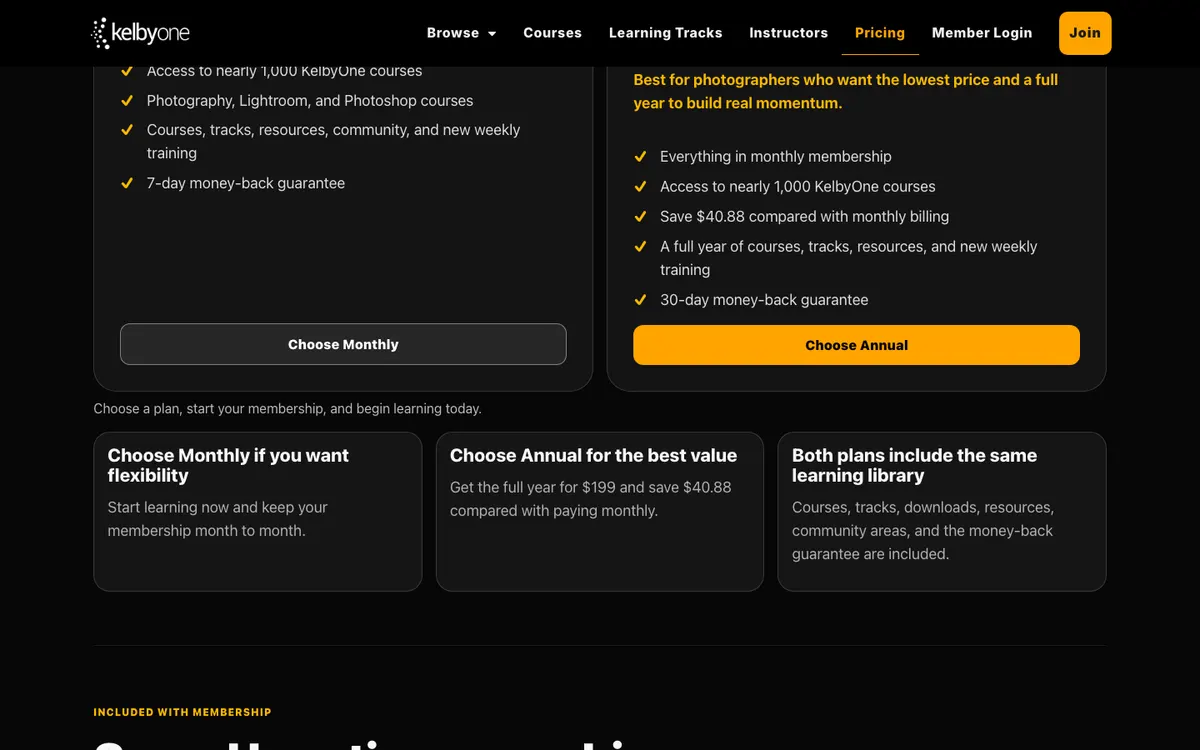
Membership shown at $19.99/month instead of $24.99, or $199/year instead of $249.
↪See offer details and conditions30-day money-back guarantee on the annual plan, 7 days on the monthly plan (official pricing page, October 30, 2026).
Monthly or annual.
Score breakdown
Weekly new courses across editing and photography.
Established since 2007 with recognized instructors.
Discounted to $199/year when we checked.
On-demand subscription.
U.S. support team; limited instructor interaction.
Weighted average of five criteria. Read our methodology.
FAQ
How much is KelbyOne?
On October 30, 2026, the monthly plan was $19.99 a month (list $24.99) and the annual plan $199 a year (list $249), about $16.58 a month. The annual plan saves $40.88 compared with paying monthly for a year.
Can I get a refund from KelbyOne?
Yes, within a window. The pricing page lists a 30-day money-back guarantee on the annual plan and 7 days on the monthly plan. There's no contract, and you can cancel any time.
Is KelbyOne good for beginners?
Yes. KelbyOne says beginners can start with beginner-friendly courses and guided tracks, then move to deeper topics. If you're brand new and want feedback on your photos as you learn, a course with critiques may suit you better.
Head-to-head comparisons
Sources
- https://kelbyone.com/
- https://kelbyone.com/pricing/
- https://www.theschoolofphotography.com/
- https://www.peltierphotocourses.com/
Prices and offers can change; confirm on the official site before you enroll.